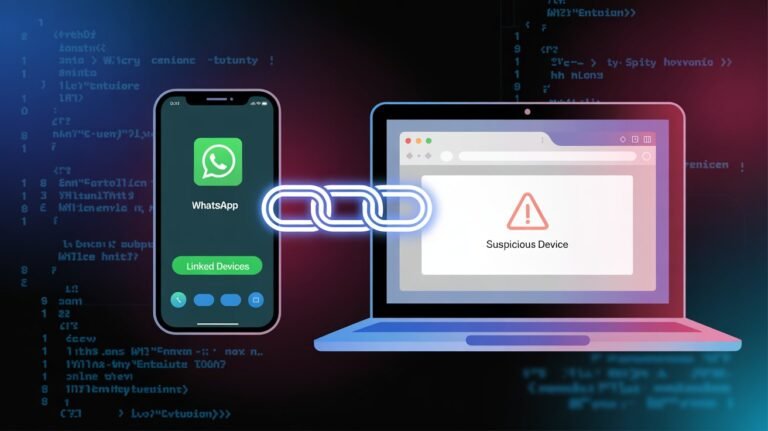


WhatsApp ghost pairing scam is the latest attack method criminals are using to quietly mirror your chats, photos and documents without logging you out or stealing your password. Instead of brute‑forcing logins, attackers abuse WhatsApp’s Linked Devices feature and rely on social engineering to get your approval. Cybercriminals know that if they can create enough urgency or fear, many users will scan a QR code or enter a pairing code without thinking twice. This guide breaks down how ghost pairing really works, why it is so dangerous, and the exact steps you should take today to harden your account.
Key Takeaways
-
Ghost pairing turns WhatsApp’s Linked Devices feature into a stealth surveillance tool that mirrors your chats in real time.
-
Attackers rarely need your password; they just need you to approve a pairing code or QR code that looks legitimate.
-
Social engineering and urgency (“verify now or lose access”) drive most WhatsApp ghost pairing scams.
-
Regularly checking Linked Devices and removing unknown browsers or PCs is one of the fastest ways to cut off a ghost‑paired attacker.
-
Two‑step verification, strict code‑sharing hygiene and basic URL awareness dramatically reduce your risk.
What Is the WhatsApp Ghost Pairing Scam?
The WhatsApp ghost pairing scam is an account‑hijacking technique where attackers secretly link their own browser or device to your WhatsApp using the official Linked Devices flow. Instead of locking you out, they operate in the background and silently receive your messages, media and, in many cases, documents in real time.
Indian cyber agency CERT‑In has formally warned that this “GhostPairing” campaign can grant criminals almost full WhatsApp Web‑level access without passwords or SIM swaps. As Dr. Meera Kulkarni, a cybercrime researcher at IIT Delhi, explains, “Ghost pairing is dangerous not because it breaks encryption, but because it abuses trust in the login flow itself.”
How Ghost Pairing Hijacks WhatsApp Accounts
At the core of the WhatsApp ghost pairing scam is the device‑linking process, which normally lets you connect up to four additional devices using QR codes or numeric pairing codes. Researchers at Gen and others have shown that attackers now drive victims to fake login or voting pages that proxy legitimate WhatsApp pairing requests.
The typical playbook looks like this:
-
A message or call impersonates WhatsApp support, HR, a courier or a known contact and pushes you to “verify” your account, claim an offer or view a document.
-
You are redirected to a realistic‑looking page that asks for your phone number and then displays a pairing code or QR code. That page is wired to WhatsApp’s real device‑linking endpoint.
-
When you enter that code inside WhatsApp, you legitimately link the attacker’s browser as a trusted device, effectively giving them a live feed of your account.
“Lead analyst Jonas Richter at security firm Gen notes that GhostPairing collapses the gap between phishing and full account mirroring in a single, seemingly routine step.”
Why Ghost Pairing Is So Hard to Detect
Unlike traditional hijacks, the WhatsApp ghost pairing scam does not usually trigger logouts, SMS floods or obvious security alerts. Chats, calls and backups continue to work as usual, so most victims do not realize a second device is quietly synced in the background.
CERT‑In’s advisory stresses that once linked, attackers can read and receive messages, view photos and videos, and even send messages to your contacts and groups. Over time this enables:
-
Targeted fraud and payment scams using your identity.
-
Blackmail based on private photos, voice notes or conversations.
-
Deep profiling for future attacks across banking, email or social media.
According to Dr. Lina Ortega, an AI and security specialist at Oxford Internet Institute, “GhostPairing shows that the biggest risk in messaging apps is no longer brute‑force hacking, but low‑friction access that feels like normal usability.”
The Psychology: Urgency, Fear and Social Engineering
The WhatsApp ghost pairing scam depends more on human behaviour than on advanced malware. Bitdefender and other researchers highlight how attackers use robocalls, spoofed numbers and scripted chats to build just enough credibility to request a verification or pairing code.
Common emotional levers include:
-
Threats of immediate account suspension or “compliance checks” if you do not act.
-
Promises of job offers, refunds, subsidies or exclusive rewards that “expire soon.”
-
Timing messages around festivals, deliveries or exam seasons to feel plausible.
As Arun Bhatia, CEO of SecureLayer Labs, puts it, “Any message that combines urgency, authority and a request for a code should be treated as malicious by default.”
How to Protect Yourself from WhatsApp Ghost Pairing Scam
Defending against the WhatsApp ghost pairing scam is less about technical skills and more about disciplined habits. The following controls offer strong, practical protection:
Core Account‑Level Defenses
-
Never share codes or scan unsolicited QR codes
Do not share WhatsApp verification codes or pairing codes with anyone, even if they claim to be from support, HR or a bank. Ignore QR codes sent via chat, email or social media that ask you to “verify” or “link” your account. -
Enable two‑step verification in WhatsApp
Turning on two‑step verification adds a 6‑digit PIN that attackers would also need to change critical settings or re‑register your number. CERT‑In explicitly recommends this as a barrier against account abuse, even though it does not fully neutralize GhostPairing. -
Audit Linked Devices weekly
Open Settings → Linked Devices and remove any browser, PC or device you do not recognize. This instantly cuts off ghost‑paired sessions and should become a regular digital hygiene routine.
Behaviour and Awareness Controls
-
Slow down when you feel pressure
Security trainers consistently advise pausing whenever a message mixes urgency with security actions, because taking 30 seconds to verify can prevent long‑term privacy loss. Validate sensitive requests via a separate, trusted channel before acting. -
Treat external “login” pages with suspicion
Do not enter your WhatsApp number or codes into third‑party sites claiming to be WhatsApp, Facebook or voting portals, a risk also flagged in multiple phishing investigations. Check the domain, look for HTTPS, and when in doubt, open WhatsApp directly instead of following embedded links.
“According to Nikhil Rao, senior advisor at India’s CERT‑In, ‘User awareness is now a core control surface—if people regularly review linked devices and refuse to share pairing codes, GhostPairing campaigns lose most of their power.’
Related News (Also Read)
Phone Scam Prevention: 7 Smart Ways to Stop Fraud Calls Fast
References
-
Gen – GhostPairing WhatsApp Attack Research: https://www.gendigital.com/blog/insights/research/ghostpairing-whatsapp-attack
-
CERT‑In Advisory on GhostPairing and Device‑Linking Abuse: (news coverage) https://www.deccanchronicle.com/news/cert-in-flags-vulnerability-in-whatsapp-device-linking-feature-1925305
-
Indian Express – What Is GhostPairing and Why CERT‑In Is Warning Users: https://indianexpress.com/article/technology/tech-news-technology/what-is-ghostpairing-cert-in-warning-whatsapp-users-10431559/
-
Kaspersky – WhatsApp Phishing via Fake Voting Pages and Pairing Codes: https://www.kaspersky.com/blog/whatsapp-phishing-vote/54515/
-
KnowBe4 / Bitdefender – Social Engineering Attacks Targeting WhatsApp Users: https://blog.knowbe4.com/warning-scammers-are-targeting-whatsapp-users
-
WhatsApp Help Center – About Linked Devices and Security Basics: https://faq.whatsapp.com/378279804439436
-
SecurityAffairs / Gen – GhostPairing Campaign Abuses WhatsApp Device Linking: https://securityaffairs.com/185814/hacking/ghostpairing-campaign-abuses-whatsapp-device-linking-to-hijack-accounts.html